Windows privacy settings are spread across multiple locations, making it difficult for users to see or change them all at once. A free tool now offers a centralized dashboard that gathers every relevant toggle into a single window.
The utility, designed specifically for Windows, scans the system and presents a clean grid of options—from ad tracking and diagnostics to location services and microphone access. Each setting can be toggled on or off with one click, eliminating the need to navigate through multiple menus or registry edits.
Under the hood, the tool maps each privacy control to its exact path in Windows’ settings and registry, ensuring changes are applied correctly. It also provides real-time feedback when a setting is locked by policy or requires administrative privileges, preventing confusion or failed adjustments.
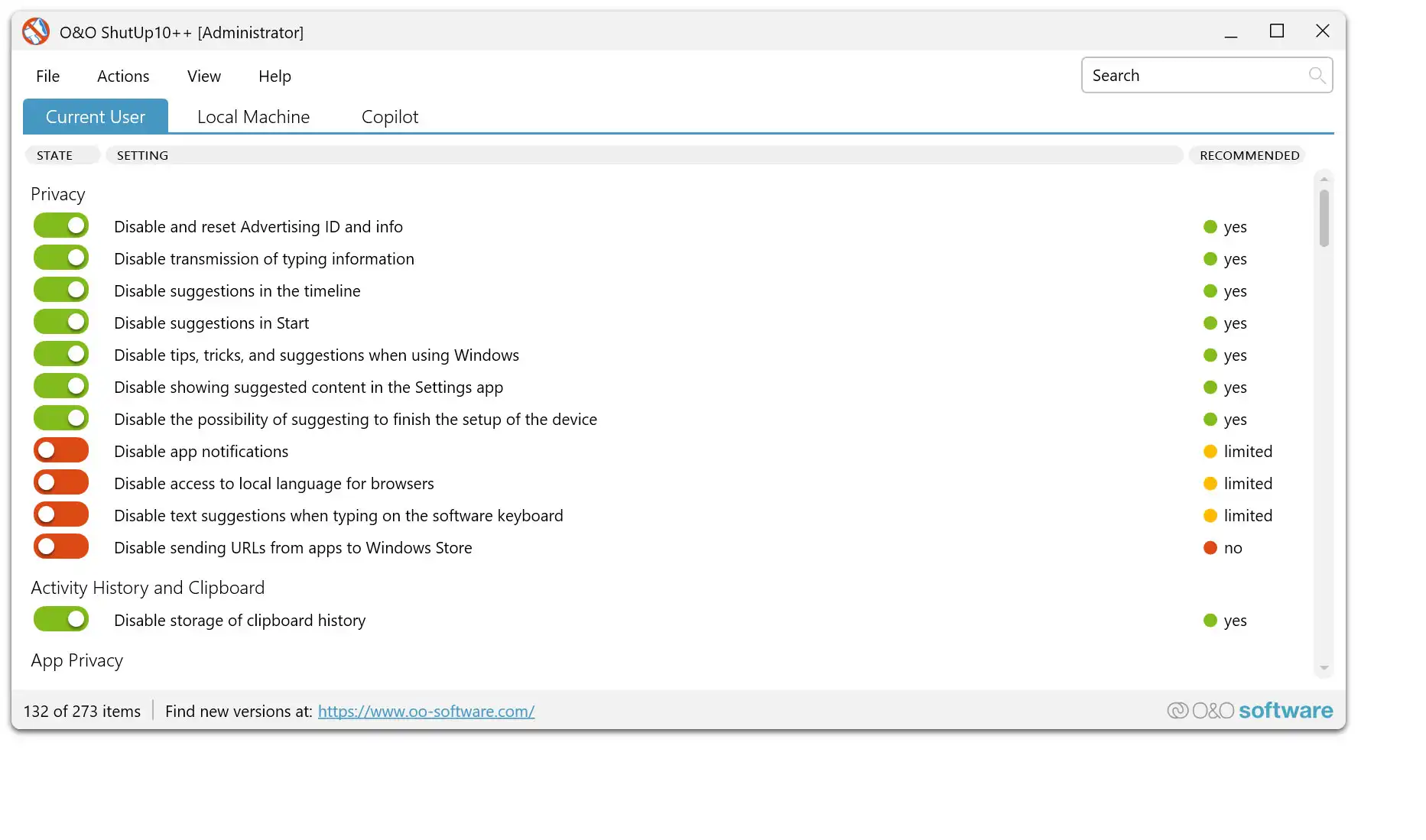
While the tool doesn’t add new functionality—it simply aggregates existing controls—its value lies in usability. Power users who frequently audit privacy settings will find it faster than digging through native menus. However, enterprise environments with strict group policies may still require manual overrides for certain controls.
The utility is available as a standalone executable and does not install persistent background services, making it suitable for temporary use or portable setups. Its lightweight design means minimal system impact, though advanced users should review its source code if verifying trust is a priority.
For those managing privacy across multiple Windows devices, this tool could become an essential companion—especially as Microsoft continues to expand and scatter privacy controls deeper into the OS.