Windows users struggling to diagnose slowdowns or mysterious background activity now have a new tool designed to turn technical jargon into actionable insights. AppControl has launched a monitoring utility that records system behavior over time, allowing users to pinpoint exactly what’s consuming resources—whether it’s a rogue application, a hidden update, or unauthorized access to sensitive hardware like webcams or microphones.
The software stands out by combining real-time monitoring with a historical timeline, letting users scroll back up to three days to investigate spikes in CPU, GPU, or disk usage. Unlike traditional Task Managers, which only show current activity, AppControl explains why performance dips occurred, translating cryptic process names into plain-language descriptions. For example, a sudden temperature surge can be traced to a specific app or driver, while privacy alerts highlight when applications request access to cameras, microphones, or location data.
Developed with a focus on accessibility, AppControl requires no registration and integrates seamlessly with modern Windows versions without triggering security warnings. The tool’s architecture—built with Flutter for a unified interface and a low-level driver for precise telemetry—enables deeper system visibility than standard utilities. Optional features, such as suspicious-app detection, operate only with explicit user consent, aligning with a privacy-first approach.
A Response to Frustration with Existing Tools
The concept behind AppControl emerged from a common pain point: users often catch a performance issue too late, with the offending process already vanished from Task Manager. Existing monitoring tools either lack historical data, demand advanced technical knowledge, or ignore privacy contexts entirely. AppControl addresses these gaps by presenting data in an intuitive, visual format. Key features include
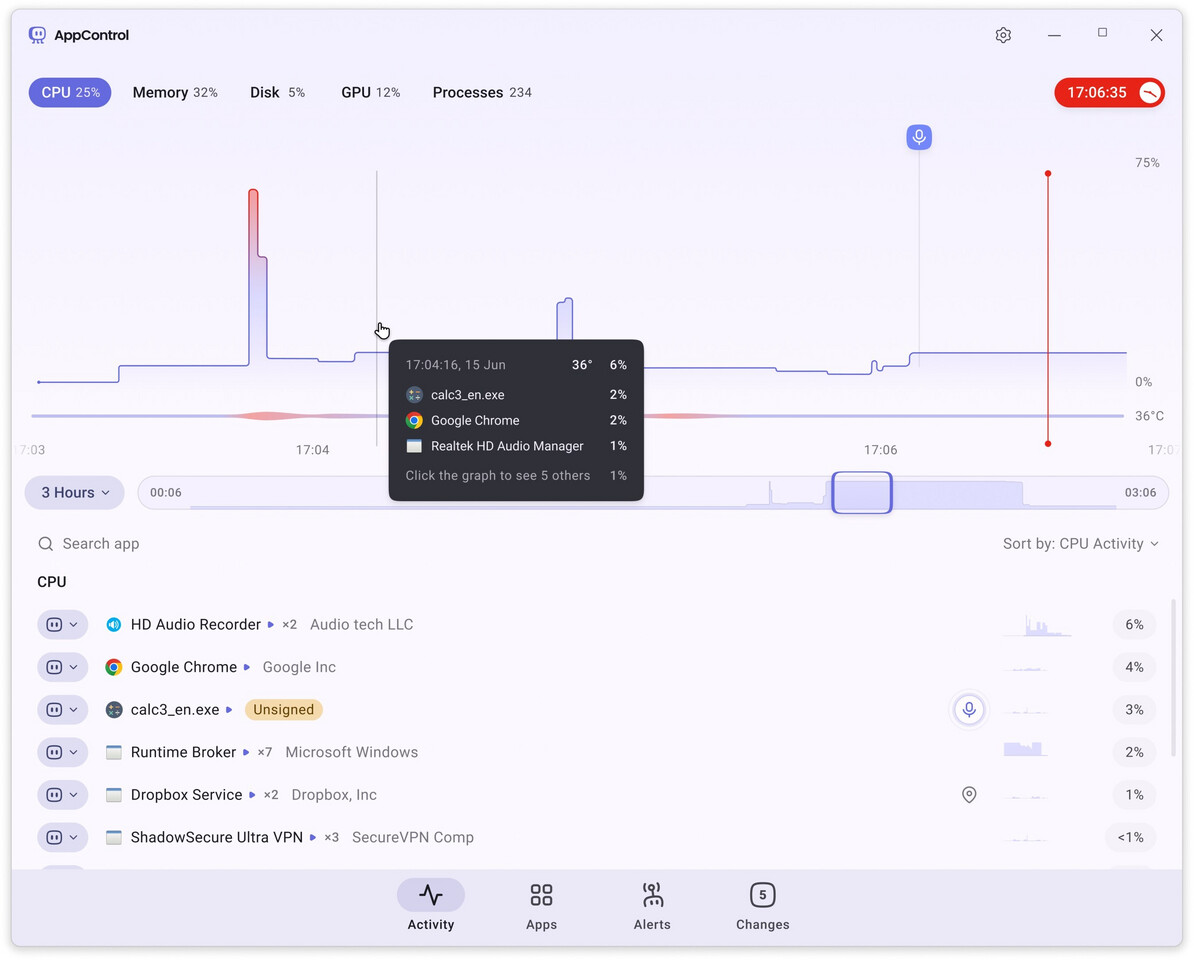
- A scrollable timeline for CPU, GPU, memory, disk, and temperature metrics.
- Plain-language explanations of processes and background activities.
- Customizable alerts for privacy events or unauthorized software updates.
- Simple controls to block or disable problematic applications.
The utility is available as a free download directly from AppControl’s website or through trusted platforms like Softpedia. As part of the Intel Partner Alliance, AppControl is positioned to integrate with future hardware advancements, though no specific optimizations for upcoming CPUs like AMD’s Ryzen 9 9950X3D2 (200 W TDP) have been announced.
Why This Matters for Everyday Users
With modern Windows systems running increasingly complex background processes—from automatic updates to cloud-syncing applications—users often lack transparency into how their hardware is being utilized. AppControl’s historical tracking transforms guesswork into clarity, empowering non-technical users to identify inefficiencies or security risks without diving into system logs. The tool’s design prioritizes trust, collecting minimal data by default and offering granular control over privacy settings.
For power users, the ability to correlate hardware telemetry with application behavior could streamline troubleshooting, while casual users benefit from alerts that flag unusual activity—such as an app silently accessing the webcam. The absence of registration barriers further lowers the entry point, making advanced system monitoring accessible to a broader audience.
As Windows continues to evolve, tools like AppControl highlight a growing demand for user-centric diagnostics. By bridging the gap between technical complexity and everyday usability, the utility may set a new standard for how users interact with their PCs—one where performance issues are no longer a mystery, but a manageable part of the computing experience.