IT environments are seeing a gradual shift in how battery status is displayed on Windows 11 devices after Microsoft introduced redesigned, color-coded battery icons through an optional update. The change, part of a staged rollout that began last year but expanded in February’s optional update (KB5077241), aims to improve visibility and power management awareness by using distinct colors—green for charging, white for normal operation, orange when energy-saving mode is active, and red at 5% or below. While the feature offers a more intuitive way to track battery levels, its inconsistent availability means some devices may not see it even after applying the update.
The new icons replace the previous flat design with larger, more pronounced symbols that include a lightning bolt when charging. Users can also opt to display exact battery percentages in the taskbar by navigating to Settings > System > Power & battery. However, because the rollout is being staged, IT teams should expect uneven adoption unless they manually deploy the update via Windows Update or the Microsoft Update Catalog.
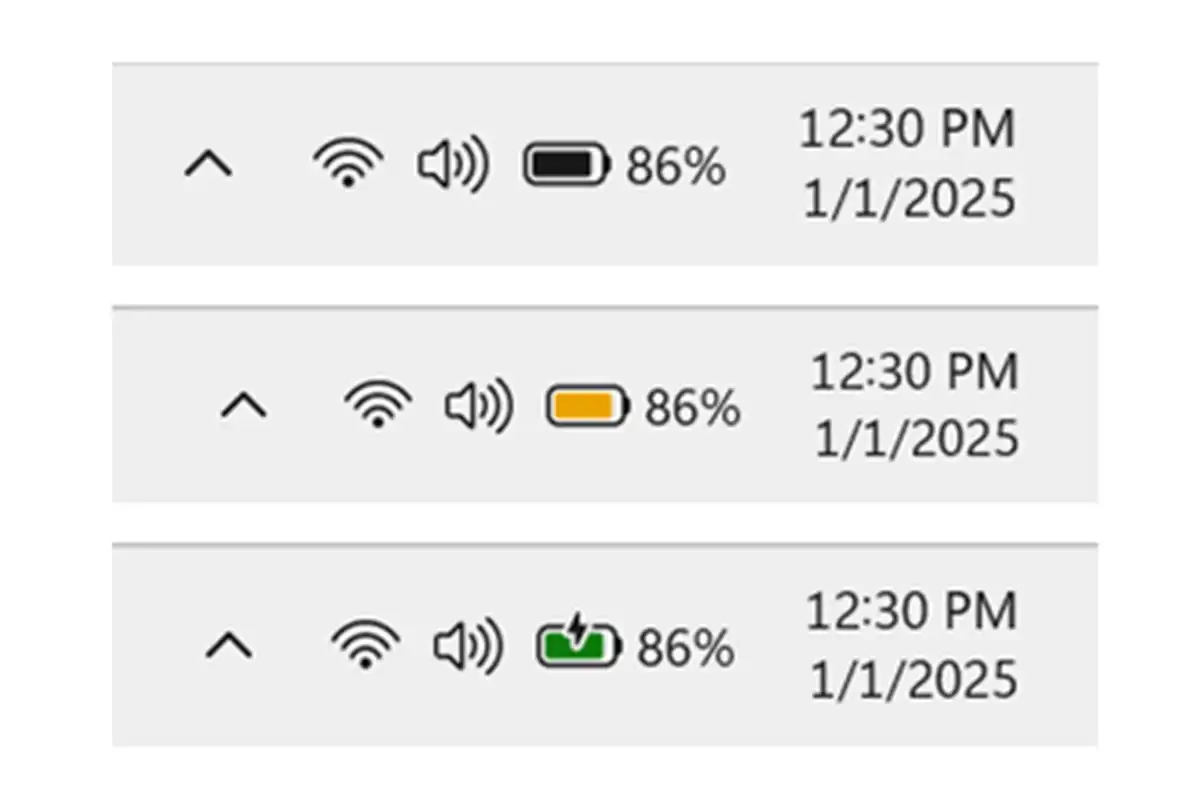
For organizations managing fleets of devices, this change introduces a more dynamic way to monitor power status, but it also adds complexity. The color shifts—while intuitive for end users—require careful calibration in environments where battery life is critical, such as laptops used for extended tasks or in remote settings. The orange indicator, triggered at 30% battery or when energy-saving mode is manually enabled, may prompt users to adjust their workflows, though the impact on performance remains a consideration.
Looking ahead, this update reflects Microsoft’s ongoing efforts to refine the user experience without disrupting system stability. While the new icons are a step toward better visibility, the staggered rollout suggests that full integration could take time. IT teams should monitor adoption closely and weigh whether the feature aligns with their power management strategies or if it introduces unnecessary variability in device behavior.