IT teams face unexpected boot failures when Secure Boot is enabled but not properly configured for their hardware or OS. The issue stems from missing platform keys or unsupported firmware configurations, which prevent systems from trusting the boot process.
The problem typically arises in enterprise environments where standardized images are deployed across diverse hardware. If a system lacks the correct Machine Owner Key (MOK) or Secure Boot database entries, it will refuse to start, creating operational delays and security concerns if workarounds are poorly implemented.
Root Causes and Solutions
The core issue is a mismatch between what the firmware expects and what the OS provides. Windows, for example, requires specific keys in the Secure Boot database (db) and key management service (kmss). If these are absent or incorrect, the system halts at boot with an error like 'Secure Boot violation.' Linux distributions often need additional steps to enroll keys manually.
Practical Steps to Resolve
- Verify the Secure Boot mode in BIOS/UEFI and ensure it’s set to 'Custom' rather than 'Standard' or 'Disabled.'
- Check if the platform key (PK) is properly installed. If not, enroll the default Microsoft PK or a custom one using manufacturer tools.
- For Windows systems, ensure the Secure Boot database (db) contains the necessary entries. Use tools like
bcdedit /enum firmwareto inspect configurations. - On Linux, use
mokutil --sb-stateto check enrolled keys andshim-signedfor bootloader compatibility.
Enterprise buyers should prioritize systems with pre-configured Secure Boot support, particularly those using standardized imaging. Hardware without flexible key management—such as older models or budget tiers—may require more manual intervention, increasing total cost of ownership (TCO).
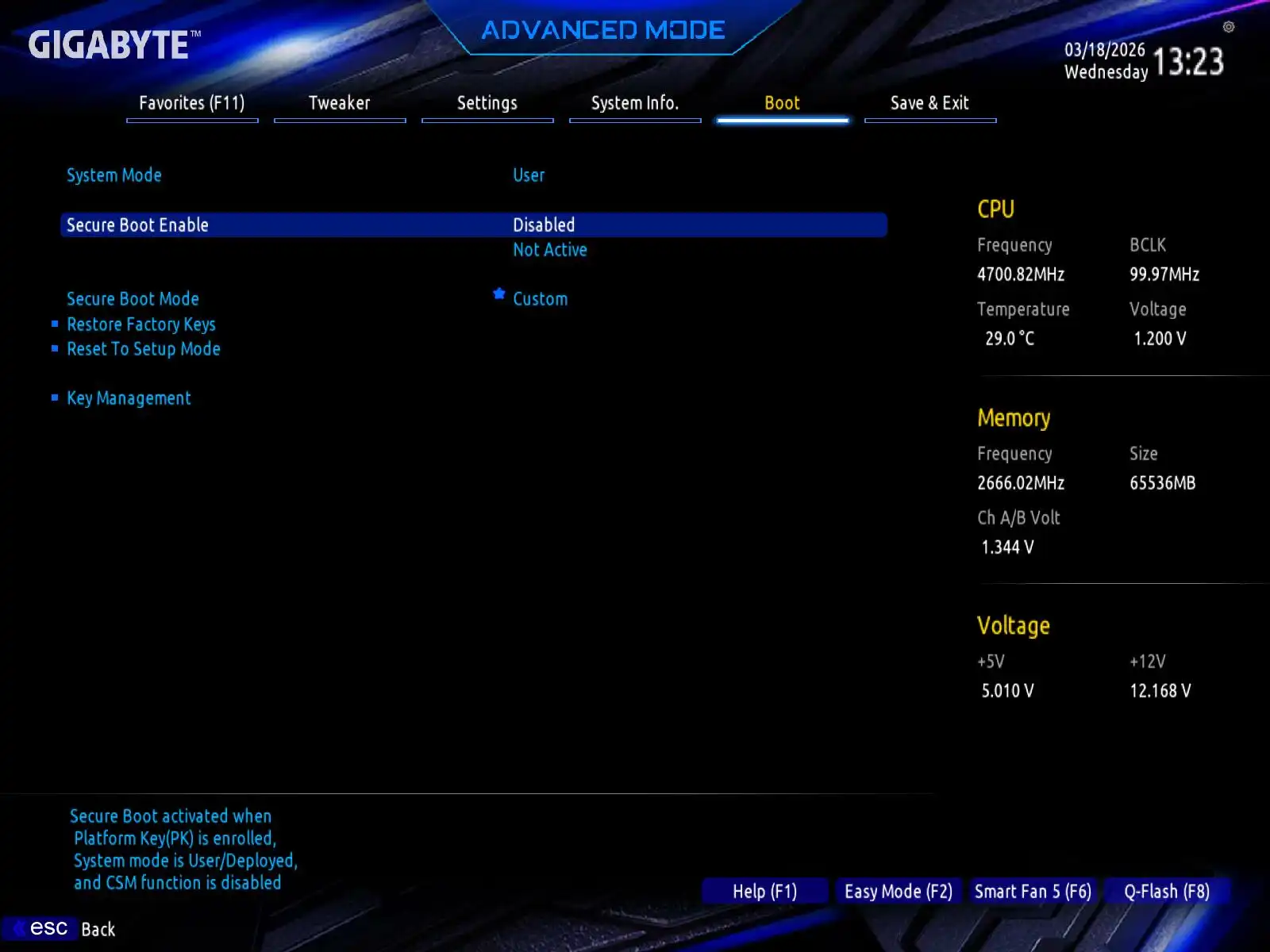
The solution lies in balancing security and usability. Organizations that enforce strict Secure Boot policies without providing fallback mechanisms risk prolonged downtime. Conversely, allowing untrusted boot paths undermines the purpose of the feature. A middle ground involves maintaining a curated list of approved keys while offering quick-recovery options for edge cases.
For most enterprise users, this means selecting hardware and software stacks that align with Secure Boot best practices from the outset. Systems with built-in key management—such as those from major manufacturers—simplify deployment and reduce the likelihood of boot failures. Those managing legacy or mixed environments should budget for additional troubleshooting time.
Ultimately, the value lies in proactive configuration. Pre-staging keys during hardware procurement cuts down on field support calls, while automated key enrollment tools streamline large-scale deployments. The trade-off is minimal: a small upfront effort to avoid larger operational disruptions later.