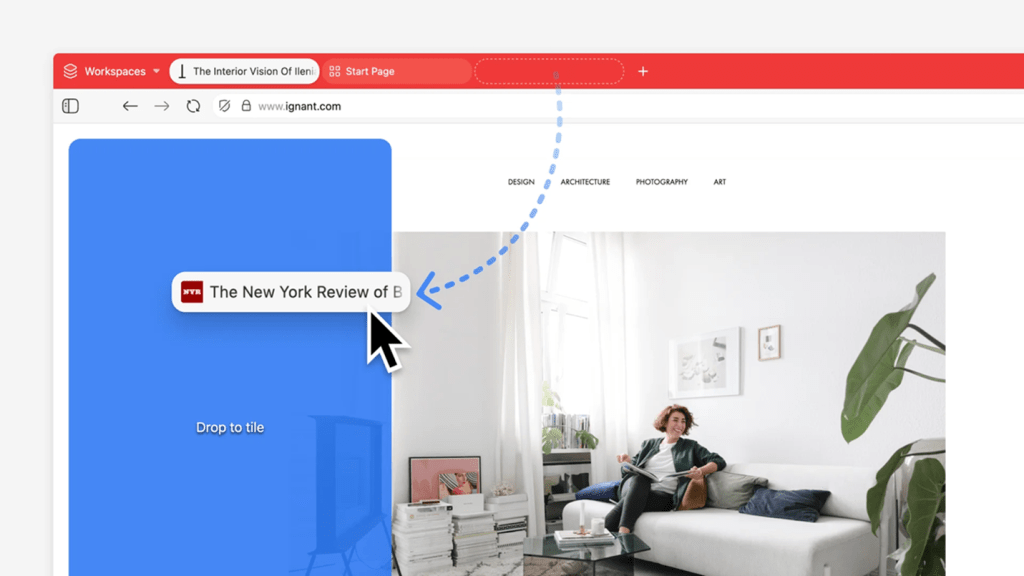
For power users drowning in browser tabs, Vivaldi has introduced a feature that might feel familiar to Windows veterans: tab tiling. Unlike traditional tab management, which stacks pages vertically or horizontally, Vivaldi’s approach divides a single tab into resizable panes—each hosting a different website. It’s a direct response to the chaos of juggling dozens of tabs while trying to keep critical content visible.
The feature arrives in Vivaldi 7.8 as open as tiled tab, allowing users to split a tab into multiple sections. These panes can be rearranged, resized, or even locked to specific sites to prevent accidental drag-and-drop misplacement. Refresh intervals can be set for live content, such as dashboards or monitoring tools, ensuring data stays current without manual updates.
Why This Matters for Productivity
Most browsers treat tabs as discrete entities, forcing users to switch between them or rely on extensions for multi-pane views. Vivaldi’s solution eliminates that friction by embedding the functionality natively. The tradeoff? Tiled tabs consume screen real estate differently—shrinking panes too much renders content unreadable. But for users who rely on side-by-side comparisons (e.g., coding across docs, tracking multiple research threads), the gain in visibility outweighs the loss.
Another refinement targets the oops moments of tab hoarding: pinning. Users can now lock a tab to a specific site, preventing it from being accidentally reassigned. This is particularly useful for reference pages or tools that must remain accessible. The feature extends to Vivaldi Mail, where a dedicated tab can follow users across workspaces—handy for those who treat their browser as a command center for email, RSS, and notes.
A Step Toward Smarter Workflows
While tab tiling won’t replace dedicated apps for heavy-duty multitasking, it bridges the gap for lighter workflows. The lack of a cloud-sync option for RSS feeds (a long-standing omission) remains a minor frustration, but the core improvement—organizing content without context-switching—is a meaningful upgrade for users who treat their browser as a digital workspace.
Vivaldi hasn’t specified a release date for the update, but the changes reflect a broader trend: browsers are evolving beyond passive document viewers into active productivity tools. For tab hoarders, this might finally be the feature they’ve been waiting for.