What is a Storage Server?

At its core, a storage server is a dedicated computer system designed primarily to store and manage digital data. Unlike traditional personal computers focused on processing tasks, storage servers prioritize reliable and efficient data access. They act as central repositories, offering enhanced security, scalability, and often, improved performance for applications that heavily rely on data retrieval.
The Role of Storage Servers in Modern IT
In today’s digital landscape, the volume of data generated is constantly increasing. Businesses are collecting information from countless sources – customer interactions, operational records, marketing analytics, and more. Without a structured approach to managing this data, organizations face significant challenges related to storage capacity, accessibility, security, and regulatory compliance. Storage servers directly address these issues by providing a centralized environment for storing, organizing, and protecting valuable assets.
Key Components of a Storage Server
Several key components contribute to the functionality of a storage server
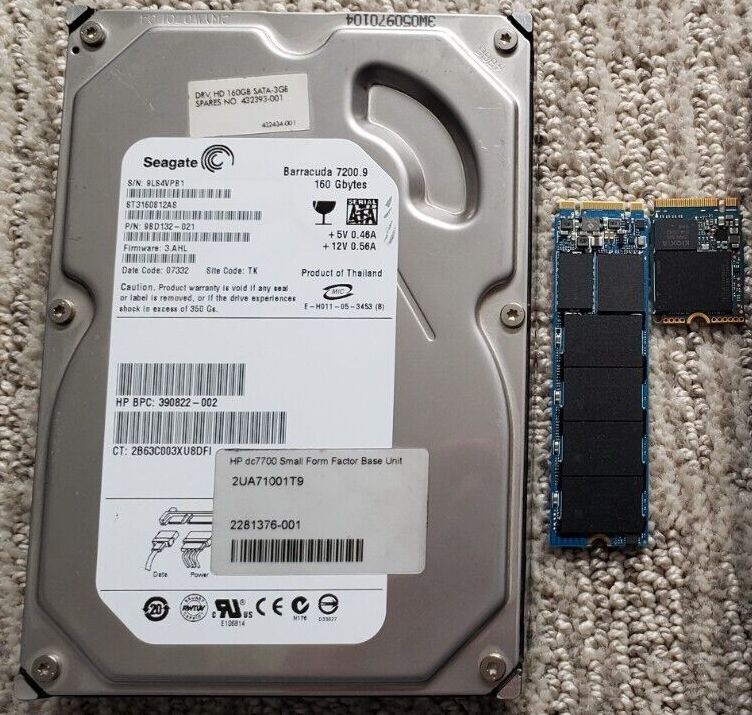
- Storage Media: This is the physical component responsible for holding data. Common types include Hard Disk Drives (HDDs) known for their high capacity and cost-effectiveness, Solid State Drives (SSDs) offering faster access speeds and improved reliability, and increasingly, hybrid solutions combining both technologies.
- RAID (Redundant Array of Independent Disks): RAID is a critical technology that utilizes multiple drives to improve performance, redundancy, or both. Different RAID levels (e.g., RAID 0, RAID 1, RAID 5, RAID 6) offer varying trade-offs between these characteristics.
- Network Interface Card (NIC): The NIC enables the storage server to connect to a network, facilitating data access for users and applications. High-speed NICs are essential for optimal performance, particularly in environments with demanding workloads.
- Operating System: Storage servers typically run specialized operating systems designed for efficient data management and storage administration. These OS’s often include features like volume management, snapshotting, and replication.
- Management Software: This software provides tools for monitoring server performance, configuring storage settings, managing user access, and implementing backup and recovery procedures.
Types of Storage Servers: NAS, SAN, and DAS
While all three types serve the same fundamental purpose – storing data – they differ significantly in their architecture and how they connect to other devices
- DAS (Direct-Attached Storage): In a DAS configuration, storage devices are directly connected to a single server. This is often simpler and more cost-effective for smaller deployments but can be less scalable than NAS or SAN.
- NAS (Network Attached Storage): A NAS device connects directly to a network and provides file sharing services. It's commonly used by small businesses and home users for storing documents, media files, and backups. NAS devices typically operate on protocols like NFS and SMB/CIFS.
- SAN (Storage Area Network): A SAN is a dedicated high-speed network that connects servers to storage devices. It offers the highest performance and scalability but also requires more complex setup and management. SANs commonly use Fibre Channel or iSCSI protocols.
Applications of Storage Servers: Beyond Basic Data Storage
Storage servers are increasingly vital across a wide range of industries and applications
- Artificial Intelligence (AI): AI workloads, particularly those involving machine learning, require massive amounts of data for training. Storage servers provide the necessary capacity and performance to handle these demanding tasks.
- Video Production & Editing: Large video files necessitate high-speed storage solutions. Storage servers with SSDs and redundant configurations are ideal for professional video production workflows.
- Backup and Disaster Recovery: Storage servers serve as reliable repositories for regular backups, ensuring business continuity in the event of data loss or system failures.
- Virtualization Environments: Virtual machines require significant storage resources. Storage servers provide a scalable foundation for supporting multiple virtual environments.
- Cloud Storage Management: Many organizations use storage servers as intermediaries for managing and optimizing their cloud storage infrastructure.
Scalability and Future Trends
As data volumes continue to grow exponentially, scalability is a paramount concern when selecting a storage server. Modern storage solutions increasingly incorporate technologies like Software-Defined Storage (SDS) which allows for flexible provisioning and management of storage resources. Furthermore, trends such as NVMe SSDs and object storage are transforming the landscape, offering even greater performance and efficiency. The integration of AI into storage management – predictive maintenance and automated optimization – is also becoming more prevalent.
Choosing the Right Storage Server
Selecting the appropriate storage server depends on several factors including budget, workload requirements, data growth projections, and desired levels of redundancy and performance. Careful consideration of these elements will ensure a robust and efficient storage infrastructure that meets your organization’s needs.