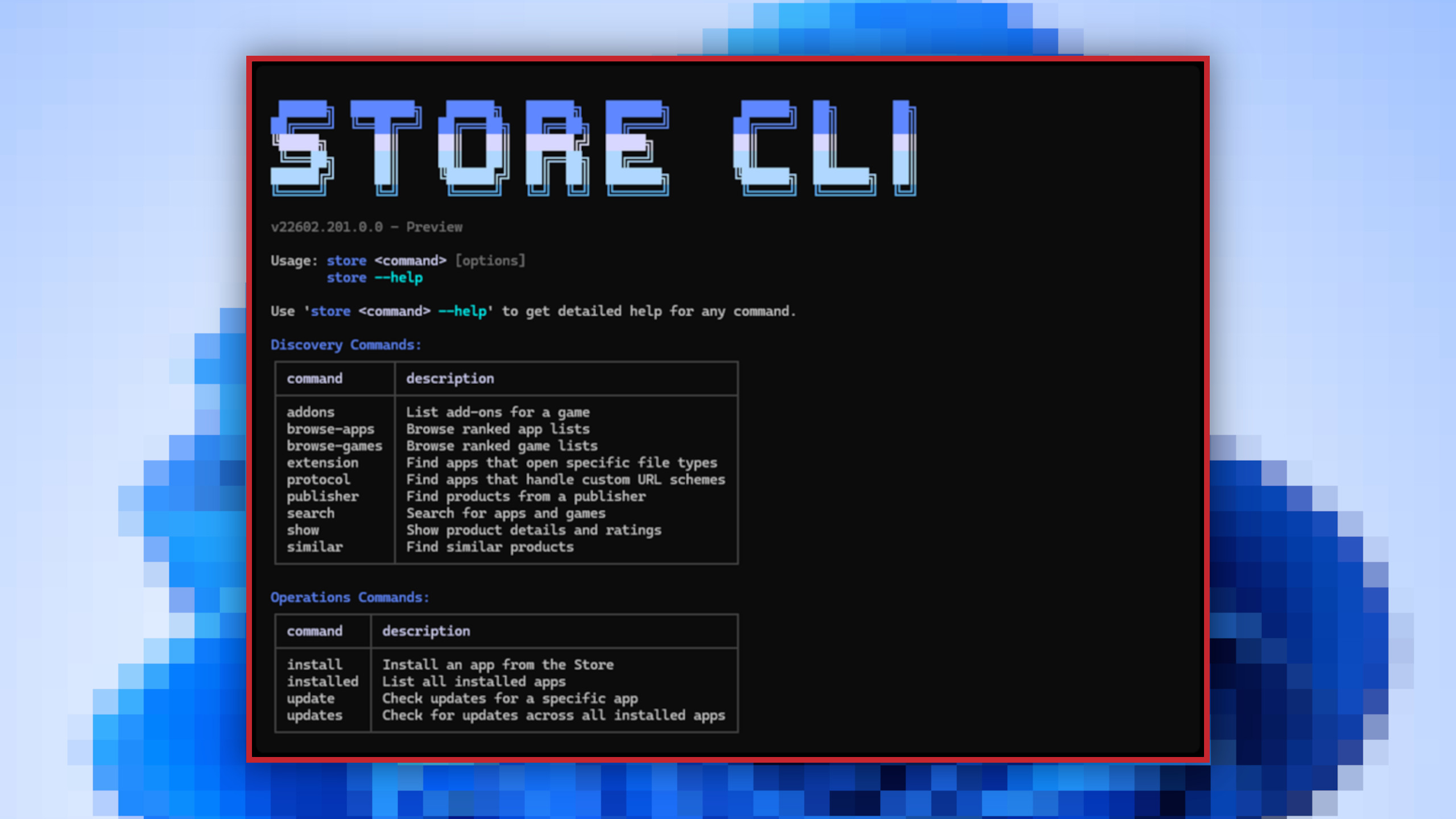
Microsoft has quietly introduced a command-line interface for the Microsoft Store, a move likely to delight developers and automation enthusiasts. The new tool replaces the traditional graphical app store with a text-based system, allowing users to search, install, and update applications using simple terminal commands.
For years, the Microsoft Store has been criticized for its bloated design, particularly for users who prioritize efficiency over visual polish. The new CLI—dubbed Microsoft Store CLI—addresses this by eliminating unnecessary UI elements. Instead of navigating through menus, users can now execute commands like store browse-apps to filter the catalog, store install to deploy apps, and store update to ensure software stays current.
This isn’t Microsoft’s first foray into command-line app management. Tools like Winget (Windows Package Manager) have already given users granular control over software deployment, but the Store CLI brings that precision directly into the official Microsoft ecosystem. The feature is currently limited to systems with the Microsoft Store enabled, though no word yet on whether it will expand to other platforms.
Why This Matters
The shift to a CLI isn’t just about aesthetics—it’s about speed. Developers deploying apps across multiple machines or managing enterprise environments will appreciate the ability to script installations and updates. Power users who prefer terminal workflows can now interact with the Store without the overhead of a graphical interface. That said, the tool isn’t a replacement for the traditional Store; it’s an alternative for those who find the classic version cumbersome.
Key Commands at a Glance
- Browse:
store browse-apps– Search and filter the Store catalog by name, category, or other criteria. - Install:
store install– Deploy an app using its unique identifier. - Update:
store update– Ensure an app is running the latest version. - Help:
store --help– View a full list of available commands and usage notes.
While the CLI may feel underwhelming to casual users, it fills a gap for those who rely on automation. Microsoft hasn’t confirmed broader adoption plans, but if the tool gains traction, it could become a staple for developers and sysadmins managing Windows environments at scale.
The new CLI is already available on supported systems, though its long-term role in Microsoft’s app ecosystem remains to be seen.