Windows users who’ve long relied on external tools like Ookla or ISP-provided tests to gauge their internet performance now have a simpler option. Microsoft has quietly integrated a built-in speed test into Windows 11, accessible directly from the system tray or Wi-Fi settings. The feature, confirmed for Release Preview builds targeting 25H2 and 24H2, marks a rare instance where Microsoft has streamlined a common but previously cumbersome task.
The speed test measures three key metrics: download speed, upload speed, and ping latency. Unlike standalone apps, this tool launches directly from Windows’ network icon, bypassing the need to open a browser or download additional software. The results appear in a familiar format, allowing users to compare their actual speeds against their ISP’s advertised service tier—a useful check for throttling or network issues.
Why this matters
For power users, network administrators, or even casual gamers, knowing real-time internet performance is critical. A slow connection might indicate ISP problems, router misconfigurations, or even interference from neighboring networks. Historically, users had to rely on third-party websites or apps to run these tests, which often required extra steps to access. Now, the feature is embedded directly into the OS, reducing friction and making it easier to troubleshoot connectivity.
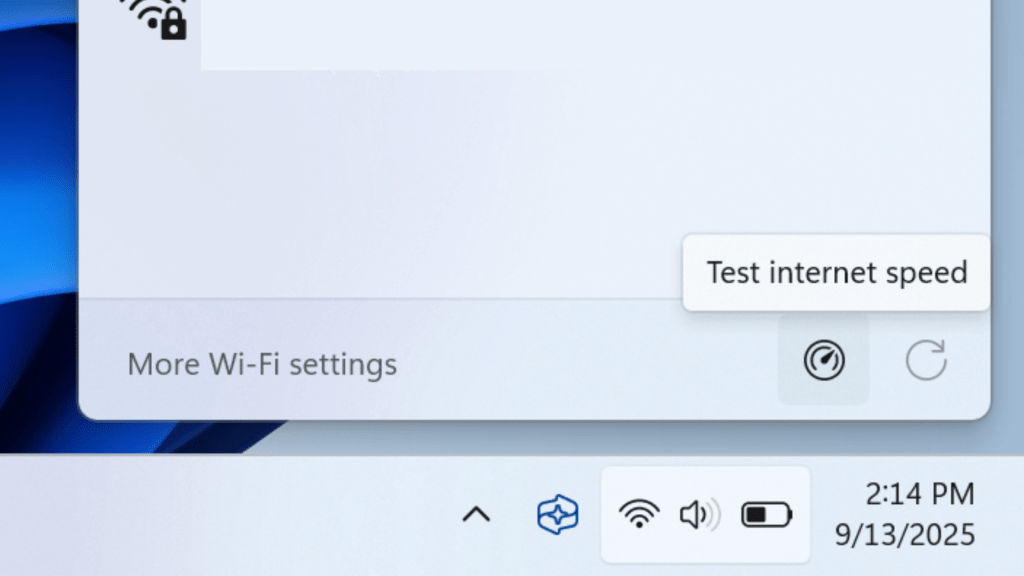
Microsoft’s approach mirrors a similar built-in speed test found on Xbox consoles, though the Windows version operates through a browser-based interface rather than a native app. The tool isn’t automatic—users must manually trigger it via the network icon or Wi-Fi Quick Settings—but its convenience could encourage more frequent checks, especially during peak usage times.
How to access it
The speed test is currently rolling out in preview builds, with a broader stable release expected in the coming weeks. To try it now
- Click the network icon in the system tray (near the clock).
- Select Wi-Fi Quick Settings (or Cellular Quick Settings for mobile connections).
- Choose Speed Test from the menu.
- The default browser will open, displaying real-time download, upload, and ping results.
While the feature isn’t groundbreaking, its integration into Windows 11 eliminates a long-standing gap. For users tired of navigating to external sites or juggling multiple tools, this small but practical update could become a staple for quick diagnostics.
Availability remains tied to the gradual rollout, so those on stable builds may need to wait. For now, checking the network icon periodically is the best way to spot its arrival.