The moment the Samsung 990 Pro arrived, the Redditor who bought it for $207—less than two-thirds of its usual $327 price—knew something was wrong. The drive’s read speeds hovered around 20 MB/s, barely faster than a USB flash drive from the early 2000s. Write speeds were even worse, struggling to exceed 10 MB/s. Yet when he checked CrystalDiskInfo, the drive reported itself as a legitimate Samsung SSD, running in PCIe 3.0 x4 mode. Windows, too, recognized it without complaint.
This is the new frontier of SSD fraud: counterfeit drives that bypass even the most basic detection tools. The scam works by cloning the firmware of real Samsung drives but stripping out the actual NAND flash inside, replacing it with slow, cheap memory that mimics the surface-level details of a genuine product. The result? A drive that passes Windows’ built-in checks, fools third-party utilities like CrystalDiskInfo, and only reveals its true nature when subjected to deeper scrutiny—like Samsung’s proprietary Magician software.
The Magician tool was the only thing that caught the scam. When the Redditor ran it, the software flatly refused to recognize the drive, displaying a stark warning: This drive is not a genuine Samsung Brand SSD with a valid serial number. The confirmation came too late for the buyer, who had already installed the drive into his system. The damage was done—not just in wasted money, but in lost trust in an already fragile supply chain.
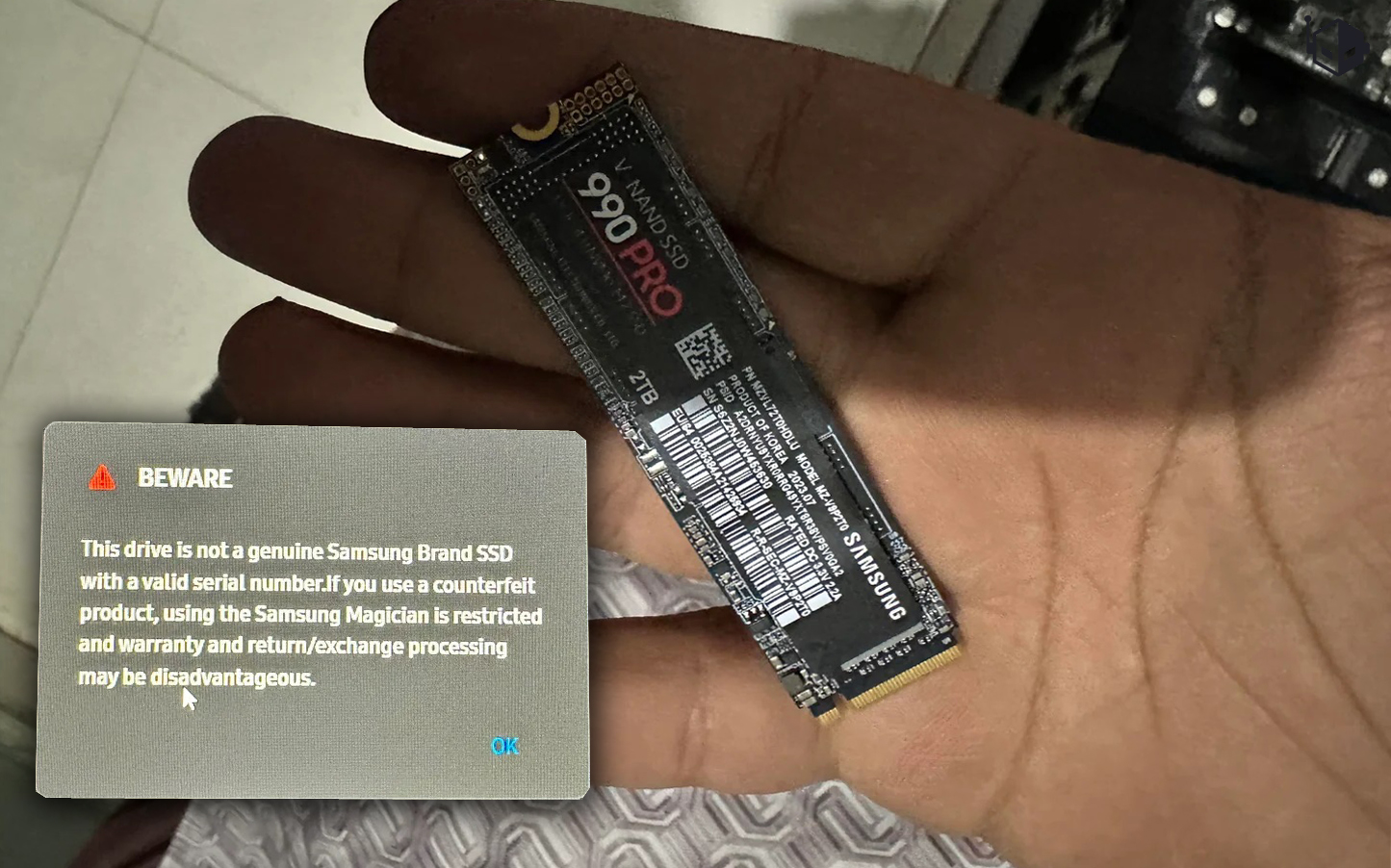
This isn’t an isolated incident. The NAND shortage has created a perfect storm for counterfeiters, driving up demand while making genuine SSDs harder to source. Scammers are taking advantage by flooding the market with knockoffs that look, smell, and even partially function like the real thing. The $207 price tag was the bait—a deal too good to be true, and in this case, it was. But the real danger lies in how easily these fakes slip past detection.
So how do you protect yourself? The first rule is simple: never buy an SSD from an unverified seller, especially at a price that seems suspiciously low. Stick to reputable retailers with return policies and warranties. If you’re unsure, use Samsung’s Magician software to scan the drive before installation. For non-Samsung SSDs, tools like HWiNFO or SSD-Z can help verify performance metrics against known benchmarks. And if a drive’s speeds don’t match its advertised specs—even if Windows says it’s legitimate—treat it as a red flag.
The Redditor who fell for the scam had one advantage: his distributor was a friend, making returns easier. Most victims won’t be so lucky. As SSDs become more critical to modern computing, the stakes for counterfeiters rise. The next time you’re tempted by a bargain-priced SSD, ask yourself: Is the risk worth the savings? In this case, it wasn’t.